FEATURES
EXCLUSIVE ROMER-G MECHANICAL SWITCHES
Fast, Durable Gaming Technology
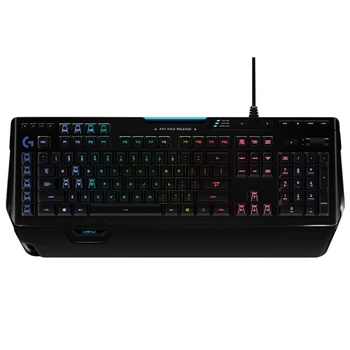
Exclusive Romer-G™ mechanical switches make Orion Spark™ key actuation up to 25 percent faster. Faster keys give you the edge in battles where every millisecond matters.
INTELLIGENT RGB ILLUMINATION
Customize With approximately 16.8 million colors
Mark keys by color to keep track of spells and game commands. The keys feature customizable lighting from a palette of approximately 16.8 million colors. Each key letter is entirely illuminated for a beautiful, evenly-lit glow.*
Download Logitech Gaming Software
Learn more
*Some profile settings require Logitech Gaming Software available for download at logitech.com/downloads
ARX CONTROL INTEGRATION
In-Game Stats on a Mobile Screen
Use your smart phone or tablet to display in-game info, vital system statistics and more. Arx Control app introduces second-screen capability, and the keyboard’s adjustable smart dock supports iOS® and Android™ devices for greater functionality.*
*Arx Control Display requires Logitech Gaming Software available at logitech.com/downloads and the compatible Arx Control mobile app available at the Apple and Android app stores.
9 PROGRAMMABLE BUTTONS
Set Macros and Custom Commands
Customize your favorite game with 9 individually programmable G-keys. Orion Spark supports up to 27 commands across three profiles for maximum convenience. Logitech Gaming Software makes setting up commands easy.*
Learn more about the performance facet keyboard layout.
*Some profile settings require Logitech Gaming Software available for download at logitech.com/downloads
DEDICATED MEDIA CONTROLS
Play, Pause, Mute, Adjust
Use dedicated media controls to play, pause, and mute audio and video. The on-board roller bar adjusts the volume, or skips to the best scenes at the touch of a button.
specification
Part No
Black: 920-008020
Warranty Information
2 year limited hardware warranty
system requirement
Windows® 10, Windows 8.1, Windows 8, Windows 7
USB power port
Internet connection for downloading optional software
Package Contents
keyboard
Palm rest
User documentation
Physical specification
Height: 210.0 mm
Width: 505 mm
Depth: 34.3 mm
Weight: 1.5 kg
Line length: 1.8 meters
ROMER-G key axis:
Durability: 70 million hits
Trigger key process: 1.5 mm
The number of grams of pressure: 45 grams
Total moving distance: 3.2 mm
Keyboard specifications:
Connection Type: USB 2.0
USB Protocol: USB 2.0
USB Speed: Full Speed
Indicator (LED): Yes
LCD display: none
USB port (built-in): none
Backlight: RGB
Special keys: 9 G keys
Line Length (Power/Charge): 1.8 meters (6 feet)
While it's not a deal breaker(buy logitech keyboard)(buy logitech mx keys)(buy logitech g915), using USB Type-C at the keyboard end is generally preferable to using micro-USB because USB-C is easier to plug in and the connector may permit faster charging in some cases(buy logitech keyboard)(buy logitech mx keys)(buy logitech g915). What matters most is that you have access to some form of cable.Wireless-Keyboard Battery Life is the power source.Every wireless keyboard, without a PC-connected cable to power it(buy logitech keyboard)(buy logitech mx keys)(buy logitech g915), must rely on a battery to function. Most wireless keyboards these days use rechargeable lithium-ion batteries, though you may come across those that use old-fashioned AA or AAA batteries(buy logitech g915)(buy logitech mx keys)(buy logitech keyboard).While some keyboards that rely on the latter can last for years on a pair of AAA batteries (Logitech's K860 is rated to last for two years on a pair of AAAs)(buy logitech keyboard)(buy logitech mx keys)(buy logitech g915), a keyboard with an internal battery and a charging wire is more handy because you can plug in while charging.(buy logitech mx keys)(buy logitech keyboard) Nothing is more frustrating than realizing your keyboard is dead and you can't use your computer till you go to the store.and go get some more batteries (or salvage some from a TV remote)(buy logitech keyboard)(buy logitech g915).So, how long should the battery on a wireless keyboard last?(buy logitech g915)(buy logitech mx keys)(buy logitech keyboard) With the key illumination enabled, most keyboards from the last two years get at least 20 hours of continuous use on an internal battery (if it has key backlighting, that is). Many manufacturers give two battery-life estimates depending on whether you utilize the backlighting(buy logitech keyboard)(buy logitech mx keys)(buy logitech g915), which can cut the time between charges by more than half. In our evaluation testing, we discovered that 25 to 30 hours equates to one to two weeks of heavy daily use(buy logitech keyboard)(buy logitech mx keys)(buy logitech g915).Look for battery life estimates in weeks or months, not hours, when using replaceable AAs or AAAs. Even the most basic battery-powered keyboards should last for hundreds of hours, especially if they don't include lighted keys(buy logitech g915)(buy logitech mx keys)(buy logitech keyboard).Because LED backlighting has such a significant impact on battery life(buy logitech mx keys)(buy logitech keyboard), it's a smart idea to seek for customization and controls to assist you manage power(buy logitech keyboard)(buy logitech mx keys)(buy logitech g915). Any backlit keyboard allows you to turn the lights on and off, but some provide additional features such as brightness adjustments and the ability to turn the lights off automatically when the battery runs out(buy logitech keyboard)(buy logitech g915). Some configuration apps, such as Corsair's iCue, provide more universal power-related controls and features, such as the ability to manage when the board "sleeps" and the addition of a system-level battery indicator(buy logitech keyboard)(buy logitech mx keys)(buy logitech g915).What Do You Think of a Media Keyboard?If you're looking for a wireless keyboard to connect to your TV as part of a media PC setup(buy logitech keyboard)(buy logitech mx keys)(buy logitech g915), bear in mind that there's a subgroup of wireless keyboards designed expressly for this purpose. Entertainment keyboards, also known as "media center keyboards" or "lapboards," are all-in-one devices that are designed to be used on your lap rather than on a table.(buy logitech keyboard)(buy logitech mx keys)(buy logitech g915) The majority are lengthy, and some have keys that are larger than usual. Some types include a curved underneath surface that rests on your lap. They also have a touchpad or equivalent mouse alternative to make input control easier, with no need for a separate mouse(buy logitech g915)(buy logitech keyboard).


Comments
Post a Comment